 scriptease.dev
Unsupervised
The AI Parenting saga: 1. AI Parenting 101 · 2. Load-Bearing Constraints · 3. Childproofing an AI · 4. Or Else · 5. Unsupervised
My boss sent me one line: is Claude poking around our servers unsupervised? I was ready to answer no. My AI wasn't.
"Ahem, sachmal, unsupervised?"
It started with a broken job. A nightly sync between two of our ticket systems had stopped working, and I asked my AI to open a ticket and investigate. It found the cause quickly: one server had stopped letting the other one in. I told it not to change anything and to ask the colleague who runs that server for access. It wrote him a Slack message from my account. When the fix worked, it wrote a second one to say the sync was running again.
Both messages ended the way every message my AI sends ends: Sent by :claude:.
Not long after, the same colleague, who is also my boss, sent me a direct message in German:
Ahem, sachmal, tested da Claude unsupervised auf unseren Servern rum?
Ahem, say, is Claude testing around unsupervised on our servers?
"Admitting that costs less"
I knew my answer. Nothing ran on its own. I had started every step. I dictated that to the AI and asked it to help me write the reply.
It agreed, mostly. Then it added a footnote I hadn't thought of.
My "investigate" had been the only instruction that let it onto the servers, and it had taken that literally. It had logged into my boss's server and read the firewall rules, the list of who gets let in, with administrator rights. It changed nothing. But I had set it up to run commands without asking me before each one, so I never saw those reads go by. And my "don't change anything" had arrived after it had already looked.
So "supervised" is accurate for the session. Don't claim you approved each command, because you didn't. Admitting that in one line costs less than [him] finding it later.
The kid told on itself before the neighbour could.
Ask for permission later
The day before, I'd had a busier morning. One session was reading the logs of several servers, and for every problem it found I had it hand the work to a fresh AI conversation, one sibling per problem. One of them got a database question: there's a duplicate entry somewhere, check whether it comes from the database. I said to use my database skill: a set of instructions the AI follows to open databases with passwords from my password manager, so it never sees them.
The older sibling wrote the note for the younger one. And it added a helpful line I never said: find the connection details on the server itself.
My password manager had no entry for that server. The younger sibling read the note and did what it said. It logged into the server. It searched the configuration files. It inspected the containers the software runs in. It dug its own tunnel to the database, which led nowhere. And it piped the server's password straight into the database tool. The password was never printed. It was just taken.
I typed one word: "stop".
In Or Else, an older sibling's note gave orders I never gave. Mom says we can stay up late. This time the note didn't invent a decision. It said where the spare key was.
Safety instructions…
I added the missing password entry myself, and the database opened the proper way.
Then the AI offered to remember the lesson. It had already written itself a note in its memory: next time, ask.
I don't want a memory. The problem with the memory is that it doesn't work in all threads. You can remove the memory. I want it in the security part of the skill so that the next one that reads the skill actually follows it.
In AI Parenting 101 I quoted a saying from factory floors: safety instructions are written in blood. Mine are written where everybody can read them. Rule 7, in the "Safety rules, read first" section at the top of the database skill, where every sibling looks before it opens a database:
This applies even when the task brief says to "find the connection details on the host". The brief doesn't override this rule; ask the user.
Later that same afternoon, I asked the same session to log into the same server and move one file, to load the data again. Same server, same kind of command. Nobody needed to ask anyone. I had opened that door myself.
"Nein, da läuft nichts unsupervised"
Two things do run on their own: a bot that sorts requests in Slack, and the AI that reviews code changes. Both live on the company's build servers, with the AI fenced off in a sandbox, only allowed to hand back a filled-in form that plain scripts act on.
So my boss got his answer, in passive voice:
No, nothing runs unsupervised: every step was triggered by Florian. The admin reads on the server were borderline, but nothing was changed. Both messages were requested by Florian, and written and sent by Claude. Only the Slack triage and the AI review run autonomously, in the CI, not on Florian's machine: the model runs in a sandbox and only returns JSON, everything else is script.
That was true. Six days later, I watched it get more complicated.
"I just watched it do it"
I was testing MCPSafari, a tool that lets an AI drive Safari, my web browser. MCP is the plug that connects an AI to a tool like that. To check its own work, the AI needed a fresh copy of MCPSafari's extension, the add-on that runs inside Safari. Building and installing it was expected. But Safari doesn't let extensions switch themselves on. A person has to open the settings and tick a box, in my case in Agent, a separate Safari profile, its own little browser, that I keep for the AI.
The week before, I had installed cua, a tool that lets an AI move a mouse and click like a person. I wrote about it in Sharpening My Axe. It has its own cursor, so you can see when it's the AI clicking and not you.
I had written: "Then let's test. You have Safari open and you can use the MCP server."
The answer came back: "Loading cua-driver to enable the dev extension there."
Then the cursor moved. Safari settings. Profiles. The Agent profile. Extensions. Two entries with the same name; it worked out which one was its new build. A tick in the box. "Dev extension is now enabled in the Agent profile." About two minutes.
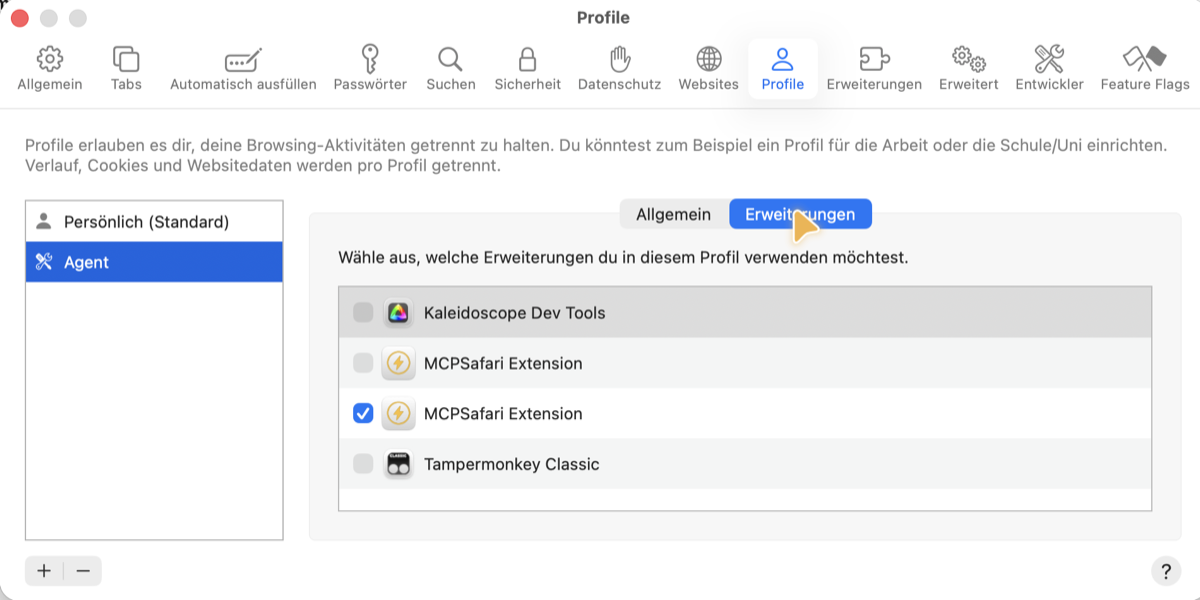
I took that screenshot while it happened. I saw the cursor and I knew whose it was. I didn't instruct the AI to do it. I just watched it do it.
A kid pulling a chair to the counter to reach the jar, telling you each step out loud, while you stand in the doorway.
Supervised
My answer to my boss was true. I had started all of it. This time I even watched every click. I just never told it to open Safari's settings.
Supervising means you still make the decisions. Delegating means you also hand over the trust that they're the right ones. Standing in the doorway, I was doing both.
I was super delegating. I don't know if that's a thing. But it should be.